Semrush logo
  • Products

    Start Here

    • Semrush One
    • Enterprise
    • Features
    • Request a Demo
    • Talk to Sales

    Find the Right Tools

    • AI Visibility Toolkit
    • SEO Toolkit
    • Traffic & Market Toolkit
    • Content Toolkit
    • Local Toolkit
    • Social Toolkit
    • Advertising Toolkit
    • PR Toolkit

    Platform

    • Integrations
    • App Center
    • API
    • Data Sources

    Top Apps

    • AdClarity
    • Exploding Topics
    • Other apps
  • Pricing
  • Resources

    Grow with Semrush

    • Blog
    • Knowledge Base
    • Academy
    • Success Stories
    • AI Visibility Index
    • Webinars
    • News

    Explore Free Tools

    • AI Visibility Checker
    • SEO Checker
    • Website Traffic Checker
    • Keyword Tool
    • Backlink Checker
    • Top Websites by Traffic
    • Explore Other Free Tools

    About Semrush

    • About Us
    • Stats and Facts
    • Integrations
    • Affiliate Program
    • Contact us
  • Enterprise
Log InSign Up
  • News
  • Data & Insights
  • Company News
  • Product News
  • Press Kit
Search icon
Semrush logo
  • Products
  • Pricing
  • Resources
  • Enterprise
  • News
  • Data & Insights
  • Company News
  • Product News
  • Press Kit
Log InSign Up

Start Here

  • Semrush One
  • Enterprise
  • Features
  • Request a Demo
  • Talk to Sales

Find the Right Tools

  • AI Visibility Toolkit
  • SEO Toolkit
  • Traffic & Market Toolkit
  • Content Toolkit
  • Local Toolkit
  • Social Toolkit
  • Advertising Toolkit
  • PR Toolkit

Platform

  • Integrations
  • App Center
  • API
  • Data Sources

Top Apps

  • AdClarity
  • Exploding Topics

Grow with Semrush

  • Blog
  • Knowledge Base
  • Academy
  • Success Stories
  • AI Visibility Index
  • Webinars
  • News

Explore Free Tools

  • AI Visibility Checker
  • SEO Checker
  • Website Traffic Checker
  • Keyword Tool
  • Backlink Checker
  • Top Websites by Traffic
  • Explore Other Free Tools

About Semrush

  • About Us
  • Stats and Facts
  • Integrations
  • Affiliate Program
  • Contact us
Main page /Product News

Keyword Research: All Recent Improvements and How They Work Together

May 12, 2020
Keyword Research: All Recent Improvements and How They Work Together
1.png
Keywords are the basis for further work on both overtaking competitors and creating on-demand content. We had achieved a measure of success in the quality of the keyword data provided, but we needed internal uniformity of the keyword research tools. 

So, we have devoted the last months to UX and UI by combining all keyword research tools into one ecosystem. Now we are pleased to inform you about how to better navigate around the tools while picking up keywords.
  • Keyword Manager: a keyword repository for collecting and analyzing all keywords in one place
  • New View of Keyword Overview & Keyword Gap

Keyword Manager: a keyword repository for collecting and analyzing all keywords in one place

You can add up to 1000 keyword lists in Keyword Manager to separate your keyword researches by topic, client, or using your own methods. Each of the lists will combine the keywords you have gathered with different tools in one place. You can send the appropriate keywords to the Keyword Manager from:
  • Keyword Magic Tool 
(The tool to uncover millions of related keywords based on a seed keyword, including long tail keywords and questions)
Keyword Manager as a separate tool has replaced the Keyword Analyzer (which used to be inside the Keyword Magic tool). 
2.png
You can choose a default list and add keywords in one click.
  • Keyword Overview
(The tool to quickly find any keyword’s search volume, CPC, best keyword variations, question-based keywords, SERP features, ranking pages, and more)

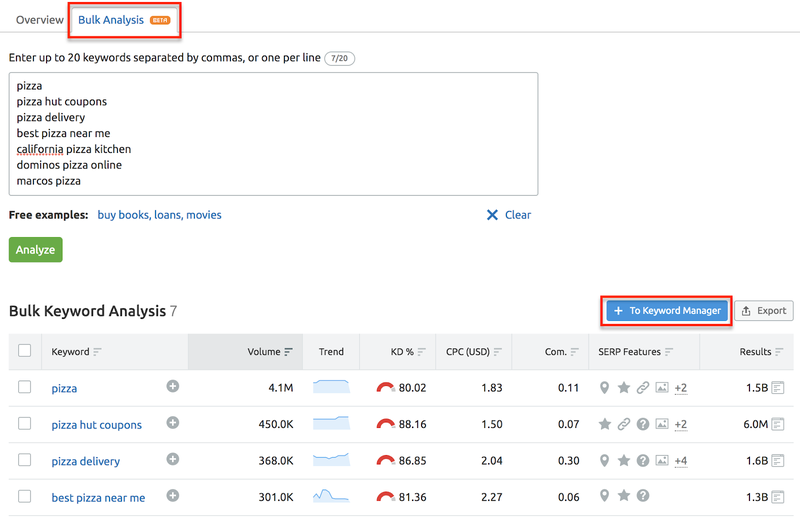
We not only significantly improved the Overview (which we will discuss in the second part), but also added a second tab called Bulk Analysis. With it, you can analyze a custom set of keywords and send the best ones to the Keyword Manager.
3.png
Remember that no matter what tool you are in, you can always click on a keyword and be brought to the analysis of this keyword in Keyword Overview.
  • Organic Research
(The tool to analyze a complete list of your competitors’ organic keyword rankings and pages)

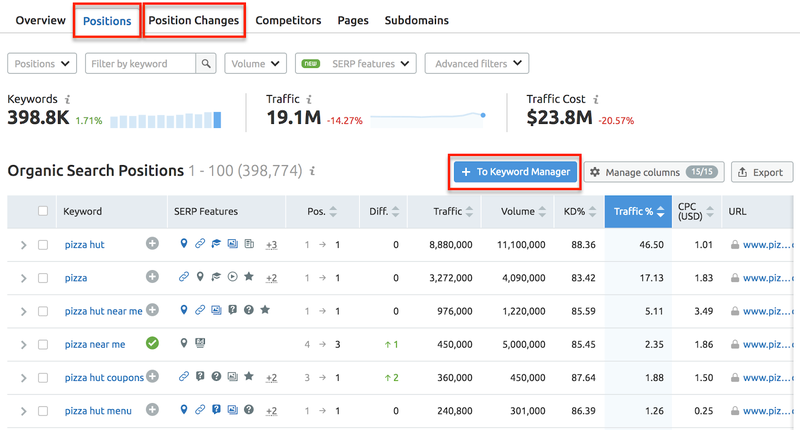
Here you can send keywords from the Positions and Position Changes reports, picking up keywords from competitors’ domains.
4.png
To make the keyword selection even more convenient, we’ve added a new column to the table on the Positions tab — SERP Features.

With it, you can quickly find out which SERP features are generated in search results for each keyword, and whether the requested domain wins a SERP feature or not. It is important to remember that some SERP features can greatly increase your traffic, like Featured Snippets, while others steal it, such as Instant Answer (because users no longer need to visit the site). 

If you know which SERP features can help you and which ones do harm, then you will probably want to filter out the appropriate keywords for which a specific SERP feature is generated by the search engine or not. To do this, use the convenient new filter at the top, or click on the icon for a specific feature.
5.png
  • Keyword Gap
The tool to compare the keyword portfolios of up to 5 competing websites side by side)

A good solution would be to choose your domain and start with Missing or Weak keywords, i.e. those for which competitor domains have higher positions than your domain, or you don’t rank for in the top 100 but they do.
6.png
For each keyword in the repository, you will see data on Volume, Trend, Cost per Click, Competitive Density, Keyword Difficulty, SERP Features, Click Potential, Top Competitors, and Last Update. You can analyze all the data right in the tool or export it.

Keyword metrics updates limits: depending on your subscription, you can get fresh metrics for 250, 1,000, or 5,000 target keywords in Keyword Manager per month.

In addition to integrating with the Keyword Manager, each of the tools has had internal improvements, in particular Keyword Overview and Keyword Gap.

New View of Keyword Overview & Keyword Gap

Keyword Overview

Remember that no matter what tool you are in, you can always click on a keyword and dive into the analysis of this keyword in Keyword Overview.

The tool has changed visually in the last month, and here is what we’ve added:
  1. Global Volume to show the total number of searches (i.e. the demand for any product) for the analyzed keyword in all databases and a list of the countries in which it is most popular.
  2. SERP Features list for a keyword to see which SERP features are being generated when searching around your keyword. 
  3. Best Keyword Variations, Questions, and Related terms provided from the Keyword Magic tool — click on View all keywords to move to the full list. 
  4. SERP Analysis to see the top 100 Google results that appear for the analyzed keyword, with metrics, so you can understand how strong these pages are: page authority score, the number of referring domains, backlinks, keywords for which the page is ranking, and search traffic volume.
7.png

Keyword Gap

If you know your competitors and want to easily collect keywords, then go to Keyword Gap. 

We have described in detail the new functionality of the tool in a separate news article, but here is a short list of why you’ll now want to use it even more:
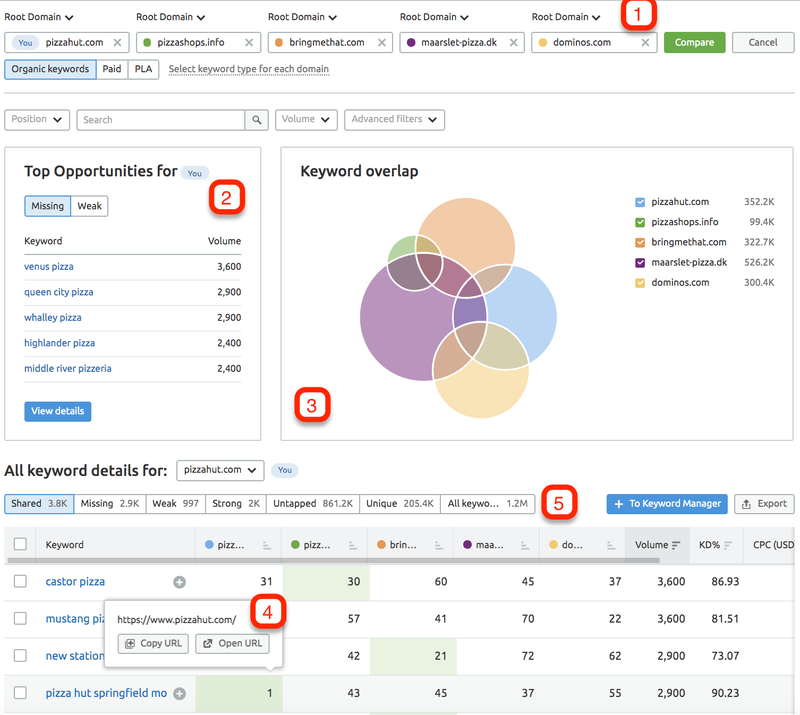
Compare specific URLs, subdomains, subfolders, or a combination to see which keywords you missed for a specific article or site section. 
  1. Compare specific URLs, subdomains, subfolders, or a combination to see which keywords you missed for a specific article or site section
  2. Top Opportunities widget that shows the keywords you should pay attention to first; for example, where a competitor is trying to drag your traffic to their site. 
  3. The instant visual SEO competitive analysis on the Keyword Overlap graph.You can see a specific page ranking in Google at a specific position.
  4. You can see a specific page ranking in Google at a specific position.
  5. The “Intersection type” filter to see the appropriate keywords in just one click:
  • Shared — keywords which each of the entered domains ranks for
  • Missing — keywords all competitor domains rank for in the Top 100, but yours doesn’t
  • Weak — keywords for which competitor domains have higher positions than your domain
  • Strong — keywords for which competitor domains have lower positions than your domain
  • Untapped — keywords your domain doesn’t rank for in the Top 100, but at least one of competitor domains does
  • Unique — keywords for which only the analyzed domain ranks
  • All keywords — a list of all keywords for which any of the entered domains rank 
8.png
Welcome to the new keyword research flow! If you have any comments, questions, or suggestions, shoot us an email at [email protected].
Run your keyword research

Download as

PDF
DOCX

Share

Relevant news

YouTube Gap Analyzer Now Available in the Semrush App Center

Semrush has introduced YouTube Gap Analyzer to its App Center, expanding the range of tools available to marketers and creators working with video.
Product News
April 22, 2026

Semrush Introduces LLM Gap Analyzer to the App Center

The LLM Gap Analyzer app helps marketers understand how and why their content appears in large language models, and just as importantly, why it does not.
Product News
April 21, 2026

Voice Assist Added to the Semrush App Center

Semrush has expanded the App Center offering with Voice Assist, an AI voice assistant developed by CallRail.
Product News
April 20, 2026

Get started with Semrush today

Try Semrush free for seven days. Cancel anytime.

Start free trial
  • Semrush One
  • Features
  • Pricing
  • Free Trial
  • Compare Semrush
  • Success Stories
  • Stats and Facts
  • Affiliate Program
  • Enterprise SEO
  • Enterprise AIO
  • Enterprise SI
  • Insights24
  • Mfour
  • App Center
  • Top Websites
  • Free Tools
  • Sensor
  • About Us
  • News
  • Careers
  • Partners
  • For Investors
  • Semrush Select
  • Global Issues Index
  • Contact us
  • Knowledge Base
  • Academy
  • API
Community
  • Semrush Blog
  • Webinars
  • Ambassador Program
LinkedInInstagramTikTokYouTubeFacebookX
© 2008 - 2026 Semrush. All rights reserved.
Privacy PolicyTerms of ServiceCookies Settings
Semrush