Your SEO headline is crucial for standing out in search and generating clicks to your site.
Writing great headlines can help you generate more traffic—a lot more.
In this guide, you’ll learn what turns a good headline into a great headline and how to write them in just six steps. Plus, get a set of powerful templates you can use to write compelling headlines for every page on your site.
What Is an SEO Headline?
The SEO headline refers to the title that’s shown when a page appears in the search engine results pages (SERPs).

The headline can be optimized and carefully crafted to rank higher in search results. This increases the page’s visibility and can help generate more clicks from search engines (also known as organic traffic).
In many cases, the headline shown in search results will match the HTML <title> tag added to the header of the page.
This title tag is the page’s official title and what appears in the browser window or tab when the page is open.

But the SEO headline is not always the same as the page’s title tag.
In some cases, Google may choose to display the H1 tag as the SEO headline.
The H1 tag on your page will often match the page’s title. But, again, they don’t have to match. Your page’s H1 is an independent HTML element—meant to contain the main headline for the page’s content.
Finally, Google will sometimes create a totally new SEO headline that appears in the SERP rather than using either the title or H1.
We’ll cover this in the Dealing with Title Rewrites section.
Why SEO Titles Matter
Writing SEO-friendly headlines can dramatically increase your organic traffic (traffic from search engines).
We know this for two reasons:
1. Headlines Are an SEO Ranking Factor
Google Search Advocate John Mueller confirmed that title tags are a ranking factor for Google. Ranking factors are the different variables that Google uses to decide where a page ranks in the list of search results.
Although he calls the impact, “tiny,” it still means an optimized title can help your page appear higher on the search engine results page (SERP).
A higher position in the SERP means you’ll usually see more clicks.
How many more clicks?
According to a Backlinko study, the top-ranking result on a Google SERP has an average click-through rate (CTR) of about 27.6%. The link in position two has a CTR of 15.8%.
This means writing good headlines is an important part of search engine optimization and your overall content marketing strategy.
2. Headlines Affect Click-Through Rate
We also know that optimizing your headlines can improve your CTR from the SERPs.
For example, that same study from Backlinko found that titles with a positive sentiment (i.e., containing words like “best” and “healthiest”) could have a 4.1% higher CTR than titles with a negative sentiment.
And basic copywriting techniques can entice more Google users to click your SEO headline.
So, if you improve your title tag, you could see more traffic even if your ranking doesn’t improve.
Note: While it’s been hotly debated for years, Google representatives say CTR is not a ranking factor. In other words, improving your CTR alone likely won’t improve your ranking. But it will mean more traffic.
What Makes an SEO Headline ‘Good’?
Great headlines aren’t just catchy.
They include proven headline writing strategies that attract the reader’s eye and attention.
For many marketers, the hardest part about crafting SEO titles is ensuring that they appeal to both humans and search engines.
In short:
Great titles are clear and compelling. They reveal what the content is about but also entice the searcher to click for more.
Let’s look at the elements you need to write a great SEO headline.
Keyword Optimization
Including the target keyword in your SEO headline is best practice.
Keywords tell both search engines and human readers what your content is about.
The headline below includes a primary keyword (“on-page SEO”) at the beginning of the title.

In some cases, it’s OK to use a close alternative or synonym if the target keyword doesn’t fit naturally into the title.
But avoid using repetitive language or jamming a bunch of unrelated keywords (“keyword stuffing”) into your headline. That would look spammy and could hurt performance.
Matching Search Intent
SEO titles should reflect the search intent of the search term.
What is search intent?
It describes the type of content that the searcher is hoping to find, based on their query.
For example, if someone searches for “J Dilla albums,” they’re probably expecting to find a list of albums released by hip-hop producer and rapper, J Dilla (i.e., his discography):

If your title tag indicates a different type of content (e.g., “Who is J Dilla?”), the searcher might assume that it doesn’t provide the information they want.
So they won’t click.
Matching search intent involves understanding both the type of content and format (e.g., listicles vs. landing pages) that the searcher is looking for.
Search intent is generally classified in four ways:
- Navigational: Users are looking for a site or page by name (“j dilla discogs page”)
- Informational: Users are looking for information on a topic (“j dilla biography”)
- Commercial: Users are looking for information about a specific type of product or service (“best j dilla books”)
- Transactional: Users are looking to make a purchase or complete a transaction (“buy j dilla albums”)
To identify the search intent for any given keyword, use Semrush’s Keyword Overview tool.
We’ll cover how to do this later in the article.
Optimal Character Count
Your SEO title only gets so much real estate in the SERPs. If the title is too long, it could be cut off and display an ellipsis.

It’s important to optimize the length of your headline to try to maximize your space while keeping it within the limitations of the SERP.
Your headline can take up 600 pixels before it risks getting cut off.
That’s generally 55-60 total characters. But it will depend on the content because some letters and characters take up more space than others.
This applies to both desktop and mobile SEO.
Power Words and Emotional Triggers
Power words add life to titles by getting your audience to feel a certain emotion as they read. They can “punch up” your headline and evoke a response from the searcher.
Use them sparingly (i.e., one or two per title) to maintain their impact.
For example, do you want your audience to feel confident and empowered?
Words like these can help:
- Conquer
- Thrive
- Unbeatable
- Effortless
But that’s just the start.

You can use all kinds of creative adjectives and modifiers to help your headline stand out in the SERPs. Experiment with different words to find what works best for your audience.
Clarity and Simplicity
Finally, it’s important to keep in mind that headlines send a message.
If you get too creative or too clever with your headline, it may become confusing or difficult to understand. Always prioritize clarity and readability over cleverness.
For instance, a title with a metaphor or pun might not make sense right away to someone skimming the SERPs.
“SEO Headlines That’ll Make You Flip Your Wig,” might be a creative take. But it’s just as likely to confuse the reader as it is to get them clicking.
How to Write an SEO Headline: Step-by-Step Guide
Let’s walk through the process of writing a headline from scratch in six steps.
1. Start with Keyword Research
First, determine the primary keyword of the page. This will need to appear in your title tag.
And if any secondary keywords would add more context, include them, too.
When you include keywords in SEO titles, it’s common practice to place them at the very beginning whenever possible.
This isn’t a strict rule. But that’s where they’re more likely to get attention.
As an example, we’ll create an SEO title for the article you’re reading.
The target keyword is “SEO headline,” which we’ll plan to place at the very beginning of the title:

If you have a secondary keyword that you’re targeting (e.g., a close variation of the primary keyword,) then you should consider including that, too.
2. Analyze the SERP and Match Search Intent
Next, we want to analyze the SERP to understand what already ranks for this query and what readers are looking for when they Google this term.
We’ll use the Keyword Overview tool.
In Semrush, click “Keyword Overview” underneath “Keyword Research” in the left-hand navigation.

Now, from the “Keyword Overview” page, type the keyword into the text box. Then click “Search.”

Now, Semrush will return the “Keyword Overview” report for this query. Right at the top, you’ll see a widget labeled “Intent,” which automatically categorizes the search intent for this query into one of a few different buckets (sometimes, even two.)

In this case, Semrush identified that the keyword has informational search intent.
This means that the content that appears in the SERPs is generally educational—guides, blog posts, etc.
This gives you a head start on understanding the search intent for this query. But you can go one step further by also reviewing the SERP and the SEO headlines of the other pages that already rank.
Going back to the “Keyword Overview” page, scroll down to the “SERP Analysis” section, which shows a recreation of the SERP for this particular keyword. Click “View SERP” in the top right.

This will return a cached version of the Google search results for this query. Now, your job is to analyze the headlines that rank here. And learn a bit more about the kinds of titles (and content) searchers expect.
Analyze the SERP for indicators about the query and the searcher.
Consider:
- Who is the target audience that might be searching for this?
- How much does the searcher already know about the topic?
- What is the searcher looking to take away from the content?
- Is the searcher a beginner or more advanced?
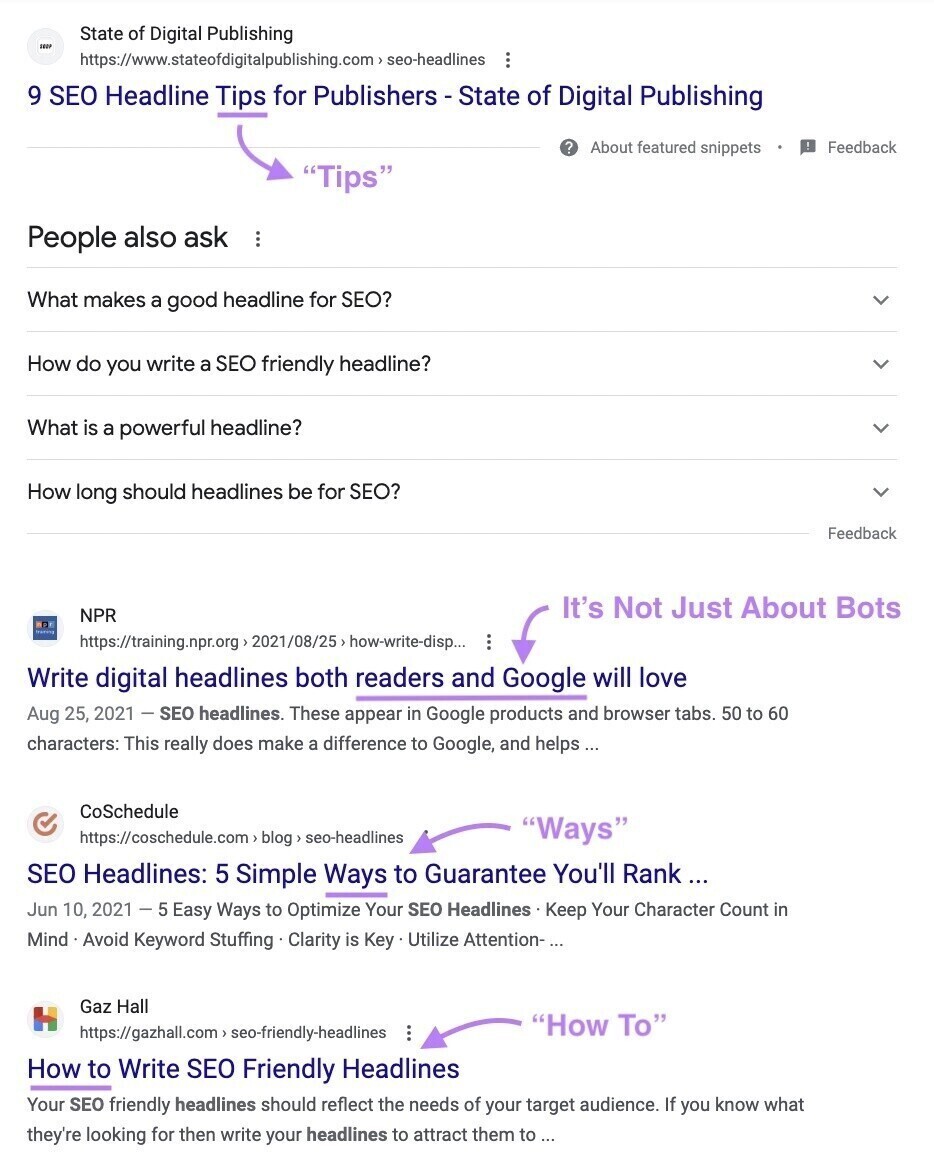
In this case, we can see a few takeaways that emerge from the top-ranking pages for “SEO headlines”:
- Intermediate content. The pages aren’t explaining the concept of an SEO headline. They’re explaining how to write them effectively.
- Actionable. Most of the titles indicate that the content contains “tips,” “ways,” or a process for “how to” write the headlines.
We’ll use this information to expand our working title: “SEO Headlines: How to Write Titles.”
This is still a rough draft, but it gives us an idea of where we’re heading.
3. Punch It Up with Power Words
Now that we have a foundation for the keyword, let’s spice it up.
At this stage, we can experiment by adding power words to evoke emotion and help our title stand out from the crowd.
We might try something like one of these examples:
- SEO Headlines: How to Write Incredible Titles
- SEO Headlines: The Easiest Way to Write Strong Titles
- SEO Headlines: A Perfect Process for Writing Great Titles
4. Add a Number
If it makes sense, you may consider adding a relevant number to your headline.
E.g., “9 tips” or “10 facts.”
Numbers and statistics can improve SEO titles for a couple reasons:
- They create a pattern interrupt, which can draw the reader’s eye
- They quantify what the content conveys, which can help users assess value quickly
The example headline below calls out, “27 of the Biggest SEO Mistakes,” to give readers a preview of what the article covers.

That said, don’t include numbers in headlines just for the sake of adding numbers. We conducted an SEO split test and found removing unnecessary numbers from a website’s headlines actually increased CTRs.
Let’s see how a number works in our example headline:
- SEO Headlines: 6 Ways to Write Incredible Titles
- SEO Headlines: The 5 Easiest Ways to Write Strong Titles
- SEO Headlines: A Perfect Process for Writing Great Titles (Plus 9 Free Templates)
But we also need to make sure that the headline matches the content of the article. Our goal isn’t to write a clickbait headline that doesn’t pay off for the reader.
Since we aren’t covering multiple “ways” or “tips,” we might instead focus on the steps we’re going through right now.
Maybe:
SEO Headlines: How to Write Titles That Rank in Just 6 Steps
5. Optimize the Character Count
Next we need to optimize the length of the title to fit within our 600-pixel space.
To do this, we recommend keeping the title to 55-60 characters.
If you want to test the title length and get an idea for how it will look in the SERP, you can use a tool like Yoast SEO plugin for WordPress.
Our previous headline fits within the character count. We could take this title and run with it.
Or we could continue to test and tweak it some more.
Ultimately, we decided to highlight the headline templates provided below as a main selling point and come up with some new title ideas.
Our final title:
How to Write SEO Headlines That Rank (+9 Powerful Templates)
Bonus Step: Measure the Emotional Marketing Value of Your Headline
The Advanced Marketing Institute Headline Analyzer tool reveals the emotional marketing value (EMV) of any title.
To see this metric, enter a title (up to 20 words long) and click the “Submit for Analysis” button.

The tool scores your title’s use of power words or emotional language on a scale of 0-100%.
6. Test Variations for Best Performance
The first SEO title you create doesn’t have to remain the title tag forever. If you notice that a page or post isn’t getting the search traffic you anticipated, consider testing alternatives.
You can use Semrush’s SplitSignal tool to easily launch and measure SEO A/B tests on all kinds of page elements, including the headline.
To get started, you’ll need to set up and install SplitSignal on your domain.
Once that’s done, from inside SplitSignal, you’ll click on the name of your project. Then click the “Create new test” button.

Now, go through the set up. On the “Name test” step, you’ll provide a “Test name” and a “Test description” in the appropriate text boxes. Then click “Create.”

On the “Inspect structure” step, select the path where the page(s) you want to test live on your site. For instance, if you want to test the headline of a specific blog post, you would select the “/blog/” directory from the list.
Note: If you want to test multiple pages in multiple directories on your site, you’ll probably want to set up separate tests rather than trying to target them all with one test.

On the “Filter pages” step, you’ll specify the exact URLs you want to target. Using the drop-downs, select “URL,” “Contains,” and then type the URL of the page you want to test.

On the “Create rules” step, you’ll select “Change the text content of an element” from rule dropdown. Then type “title” into the “CSS selector” text box. In the “Test value template” text box, type the new title you want to test for this specific page. Click “Next.”

In the final step, “Review and launch,” you’ll review the details of the step. Set the duration of the test (how many days you want to test the new title). Then click “Launch.”
Now SplitSignal will automatically test the new title and generate a report that shows you how the new title affected your page’s organic search traffic.
9 Powerful SEO Headline Templates
Need inspiration to create great headlines that grab the reader’s attention? Try using the templates below.
But remember: Avoid using the same templates across many pages on your site.
1. [#] + [Power Word] + [Keyword] + [Desired Result]
Example: “11 Powerful SEO Tools to Boost Website Traffic Instantly”
2. “How to” + [Keyword] + [Benefit]
Example: “How to Write SEO Headlines That Skyrocket Your CTR”
3. “Ultimate Guide to” + [Keyword] + [Quantified Benefit]
Example: “The Ultimate Guide to SEO Headlines: Increase Traffic By 20%”
4. [#] + [Power Word] + [Keyword] + [Time Frame]
Example: “5 Essential SEO Headline Strategies to Implement in 2024”
5. [Keyword] + [Numbered List]
Example: “SEO Headlines: 13 Mistakes to Avoid”
6. “Avoid” + [Negative Outcome] + “With” + [Keyword] + [Method]
Example: “Avoid Low CTRs With These Proven SEO Headline Techniques”
7. “The Secret to” + [Power Word] + [Keyword]
Example: “The Secret to Writing Perfect SEO Headlines”
8. “How”/“Why”/“What” + [Keyword]
Example: “What Makes an SEO Headline Effective? A Deep Dive”
9. “Why You’re Not” + [Desired Outcome] + “And How” + [Keyword] + “Can Help”
Example: “Why You’re Not Ranking and How SEO Headlines Can Help”
Dealing with Title Rewrites
Before we close out, there’s one more thing you need to know.
Google SERPs won’t always display the SEO title you wrote.
In some cases, they might make small edits to your page’s title. In other cases, they may totally rewrite your title. Using your H1 tag or a subheading or an entirely new title based on the contents of the page.
One study found that approximately 61% of all SEO headlines are rewritten to some degree.
This can be frustrating.
Especially if you’ve spent a lot of time crafting a perfect headline, only to have Google decide to ignore it entirely.
Luckily, Google has provided some guidance on when and why they “generate” (read: rewrite) headlines. (They call these “title links.”)
Key takeaways:
- Overly long titles are more likely to be rewritten
- Keyword stuffing can trigger your titles to be rewritten
- Boilerplate titles or title templates are likely to be rewritten
If you’re running into issues with this, try reviewing the documentation and adjusting your approach. If you have a large site with many pages that have programmatically generated titles, you might consider rewriting some of these manually.
Frequently Asked Questions (FAQs)
1. Is the SEO Headline a Google Ranking Factor?
Yes. John Mueller has confirmed that Google’s algorithm does consider the page’s title or headline as a factor when determining search engine ranking. Of course, it’s just one piece of the puzzle. Backlinks and website authority, quality content, and user experience also play a role.
2. What Makes a Compelling SEO Headline?
A great SEO headline is clear, concise, and engaging. It incorporates primary keywords and conveys the nature of the content accurately. It also considers the audience’s search intent and addresses their questions or goals.
3. How Do I Update My SEO Headline in WordPress?
In many WordPress themes, your page’s title and headline will be the same as the article or page name. If you want to customize the headline to be something different, you can use a plugin like Yoast SEO.
4. Is an SEO Headline the Same as a Social Media Headline?
Not necessarily. Your page’s SEO headline can be different from the headline that appears when an article is shared on social media such as LinkedIn. The social media headline is usually determined by an “og:title” meta tag in your page’s header.
5. Does Case Matter in an SEO Headline?
Capitalization case doesn’t affect how the page ranks. However, using a standard format like sentence or title case can make the title easier for users to read and understand. That could lead to a higher click-through rate and drive more traffic.